


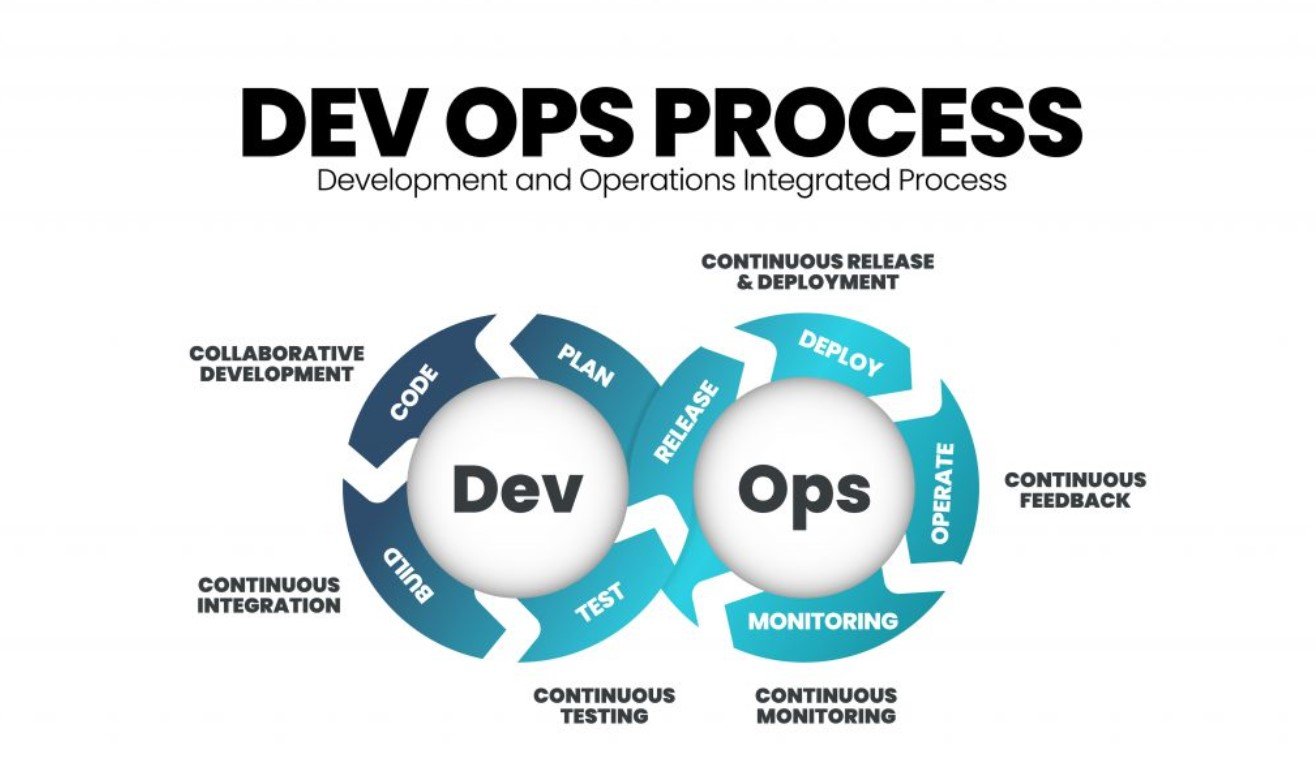
As software systems become more distributed and dynamic, understanding what is happening inside them has become increasingly complex. Modern applications run across containers, cloud services, microservices, and third-party integrations, often changing multiple times a day. In this environment, traditional monitoring alone is no longer sufficient. Observability in DevOps provides a deeper, more holistic view into system behaviour, enabling teams to detect issues early, respond effectively, and continuously improve reliability. By combining monitoring, alerting, and incident response into a cohesive practice, observability helps DevOps teams maintain stability without slowing down delivery.
What Observability Means in a DevOps Context
Observability refers to the ability to understand the internal state of a system by analysing its outputs. These outputs typically include metrics, logs, and traces. Together, they provide context about how systems behave under normal and abnormal conditions.
In DevOps, observability is not a separate function owned by a single team. It is a shared responsibility that spans development, operations, and reliability roles. Developers use observability data to understand how code behaves in production. Operations teams rely on it to maintain uptime and performance. This shared visibility reduces guesswork and enables faster, evidence-based decision-making. Professionals learning modern DevOps practices through a devops training center in bangalore are often introduced to observability as a foundational capability rather than an advanced add-on.
Monitoring as the Foundation of System Visibility
Monitoring is the starting point of observability. It focuses on collecting and visualising metrics that describe system health. Common metrics include CPU usage, memory consumption, request latency, error rates, and throughput. These indicators help teams understand whether systems are operating within expected limits.
Effective monitoring goes beyond infrastructure. Application-level and business-level metrics provide insight into user experience and service quality. For example, tracking response times for critical APIs or transaction success rates offers more actionable insight than raw server statistics alone.
Well-designed dashboards allow teams to spot trends, identify anomalies, and understand baseline behaviour. Monitoring does not explain why an issue occurs, but it signals when something needs attention.
Alerting That Enables Action, Not Noise
Alerting builds on monitoring by notifying teams when predefined thresholds or conditions are breached. The goal of alerting is not to report every anomaly but to prompt timely action when user impact or system risk is likely.
Poorly designed alerts lead to alert fatigue, where teams become desensitised to notifications and may miss critical incidents. Effective alerting focuses on symptoms rather than causes. For example, alerting on sustained high error rates is more useful than alerting on every temporary CPU spike.
Clear ownership and escalation paths are also essential. Alerts should reach the right people with enough context to act quickly. Many DevOps teams refine their alerting strategies through hands-on experience and structured learning environments, including those provided by a devops training center in bangalore, where real-world scenarios are often simulated.
Tracing and Logs for Root Cause Analysis
When monitoring and alerting indicate a problem, teams need deeper insight to diagnose the issue. This is where logs and distributed tracing become critical. Logs provide detailed, timestamped records of events within applications. Traces follow a request as it moves across multiple services, showing where delays or failures occur.
Together, logs and traces enable root cause analysis. They help teams understand not just what failed, but how and why it failed. This detailed visibility is especially important in microservices architectures, where a single user request may involve dozens of components.
By correlating metrics, logs, and traces, teams can move from detection to diagnosis much faster, reducing mean time to resolution.
Incident Response as a Structured Practice
Observability supports effective incident response by providing timely, accurate information during failures. Incident response is not just about fixing issues quickly. It is also about communicating clearly, coordinating actions, and learning from each event.
A structured incident response process typically includes detection, assessment, mitigation, resolution, and post-incident review. Observability data informs each stage. Metrics and alerts detect incidents, logs and traces guide troubleshooting, and dashboards track recovery.
Post-incident reviews use observability data to identify patterns and preventive measures. These reviews help teams improve systems and processes, turning failures into learning opportunities rather than repeated mistakes.
Building Observability into the DevOps Lifecycle
Observability is most effective when it is built into the development lifecycle from the beginning. Instrumenting applications, defining meaningful metrics, and designing clear alerts should be part of development and deployment workflows.
Automation plays an important role. Observability configurations can be versioned, tested, and deployed alongside application code. This ensures consistency across environments and reduces manual errors. Over time, observability becomes an enabler of faster delivery rather than a constraint.
Conclusion
Observability in DevOps brings together monitoring, alerting, and incident response into a unified practice that supports reliability at scale. By providing deep visibility into system behaviour, it allows teams to detect issues early, respond effectively, and continuously improve performance. As systems grow more complex, observability is no longer optional. It is a core capability that enables high-performing DevOps teams to balance speed, stability, and user trust.
